A Folio of eFolios
We are using a number of digital folio technologies this year - and we may continue using most of them. Each seems to suit a different student and teacher needs...
MS SharePoint (2003)We host and administer
SharePoint on campus. Every student can create a personal space with:
- room to upload and share documents and digital media
- message space
- tasks list - with task management functionality
- links and other modules such as discussion forums and surveys
- access control - students can set who has what level of access
- presencing - the system indicates who is currently online - integrates with MS Office

It's also possible for users to add modules that display
del.icio.us tags and
flickr feeds from mobile phone uploads:
 Moodle
We use an off-campus service with web administration. Several teachers are using
Moodle for their classes with
- space to upload documents and digital media
- forums and blogs - with tagging
- news, calendar, messages
- student management and statistics
Teachers find that Moodle provides a more controlled on-line learning environment that is particularly suited to Open Learning classes - although a few other classes also use it.

ELGG - Social Networking
This is the first time we have tried a social networking learning environment. We are using a hosted
Elgg service while we evaluate it. We are currently using it:
- for some classes and special interest groups (SIGs)
- to host learning journals
- as a digital folio for tagged multimedia
- to aggregate RSS feeds
- to connect students with similar interests and learning goals

Although we only have 80 users on this system at the moment the tags are beginning to build and link people and resources:

Some of our current questions are:
- How can year 12 students take their digital folios with them as they move on to work and further education?
- Should we attempt to provide one solution that attempts to fit all needs or should we offer several tools for students and teachers to choose from?
- How can students manage digital folios for assessment and potential employers and themselves?
- What is the relationship between our 'official' digital folios and other online spaces that students use to upload multimedia such as DeviantArt or YouTube or MySpace?
Labels: assessment, folio, ICT tools, personalisation
Assessing in VET - Freedom, Structure and Personalisation
One of the classes I teach is a year 11/12 vocational education class in Information Technology - a combined Certificate 2/3 class. The course is actually a double class of 9hrs per week and is assessed against both the
AQF VET Certificate
competencies and the
TQA Vocational Learning criteria. I recently gave a presentation showing how this course is structured and assessed.
The slides are linked below but they need some explanation...
(names and faces have been blurred for privacy)
The course has been designed to meet a number of needs:
- the wide diversity of student IT knowledge/skills/understanding
- the lack of some specific IT knowledge/skills by the teacher(s)
- the requirement for students to experience a real IT workplace
- the efficient management of assessment as learning, for learning and of learning
The wide range of student expertise provides both challenges and opportunities. Each student needs a personalised learning program based on what they already know and what they need to know. Each student knows something the others do not and can therefore help to teach. The course is highly structured to provide individual student freedom across multiple learning opportunities/environments. (See slides above for more detail.)
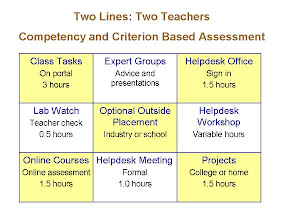
Students progress at their own pace through a list of class tasks; they form expert groups to research and present information; they work in a Helpdesk Office servicing 1100 students and staff; they maintain one of the ten campus computer labs (lab watch); they may opt to work in an outside business/industry; they maintain hardware in the Helpdesk Workshop; they complete online courses; they attend and run formal Helpdesk meetings; they work on projects on site, in the workplace or at home.
Some online courses are mandated and others are chosen by students. We use online courses provided by SkillSoft (purchased), Microsoft Training (free) and other internet sites.
This year I was involved in team-teaching the course with Jon - in previous years I have taught the double-class myself. How do I manage and assess all of this? Over the last few years I have evolved the following management and assessment strategies.
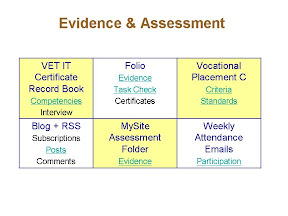 | Evidence of student competency is collected by the students and collated using a number of ICT tools. |
| From vet_assessment |
Each student collects evidence of their learning in a digital (MySite) or paper-based folio (most did both). This includes certificates from online courses, photo's from the workplace, project report forms, client evaluation sheets, class tasks... Students either write a blog or write in their paper-based folio (most chose a blog) about new technology (they subscribe to RSS feeds) and reflection on their learning. Each week every student replies to an email detailing participation across the nine learning environments.
I sit down with each student as and when required and sign off specific VET IT competencies in their formal Record Book and validate their self assessment against the Vocational Learning criteria. It all works quite well :-)
PS I'm playing with google - personalisation, widgets, picasa... and upgrading my blog - that's why you may have got the whole blog as a 'new post' in your RSS feed...
Labels: assessment, folio, freedom, personalisation, structure